Placeholder Content for Design and Testing: A Practical Guide
Where lorem ipsum came from, when real-looking copy works better, how to make safe test data from fake names and dates, and a checklist for launch day.
Key takeaways
- Lorem ipsum lets people look at type and layout without getting lost in the meaning. It is still the right choice for early mock-ups.
- Once a design has real structure, realistic copy of the right length shows problems that nonsense text hides.
- Test data should look real but be fake. Use made-up names, usernames and dates, plus reserved example domains and phone numbers.
- Never copy real customer records into a test system. Made-up data is safer and usually more useful.
- Before launch, search the whole project for lorem, ipsum, TODO, example.com and placeholder.
Placeholder content is stand-in text, names, dates and numbers. You use it while a design or system is being built, before the real content exists. Lorem ipsum is the best-known kind. It is still the right choice when you want people to look at layout rather than read. Later in a project, realistic fake data works better. It shows overflow, cut-off text and formatting bugs that nonsense text never causes. This guide covers when to use each kind. It shows how to make data that looks real without being real. It also lists what to check before anything goes live.
Why lorem ipsum exists
Lorem ipsum is scrambled Latin. It is loosely based on a passage from Cicero's De finibus bonorum et malorum, written in 45 BC. The standard text begins "Lorem ipsum dolor sit amet, consectetur adipiscing elit". Words have been removed and changed. It no longer reads as Latin, even to someone who knows the language. Printers used it as dummy text from at least the 1960s, when Letraset sold it on transfer sheets. It became universal when Aldus PageMaker shipped with it in the mid-1980s.
The reason it caught on is simple. When a page says something, people read it. Once they are reading, they stop looking at the design. They notice that the headline is dull or that a paragraph has a typo. The talk drifts away from spacing, hierarchy and colour. Nonsense text has no such pull. Its word lengths are also close to English. So it fills a column the way real writing would, with a similar mix of long and short words.
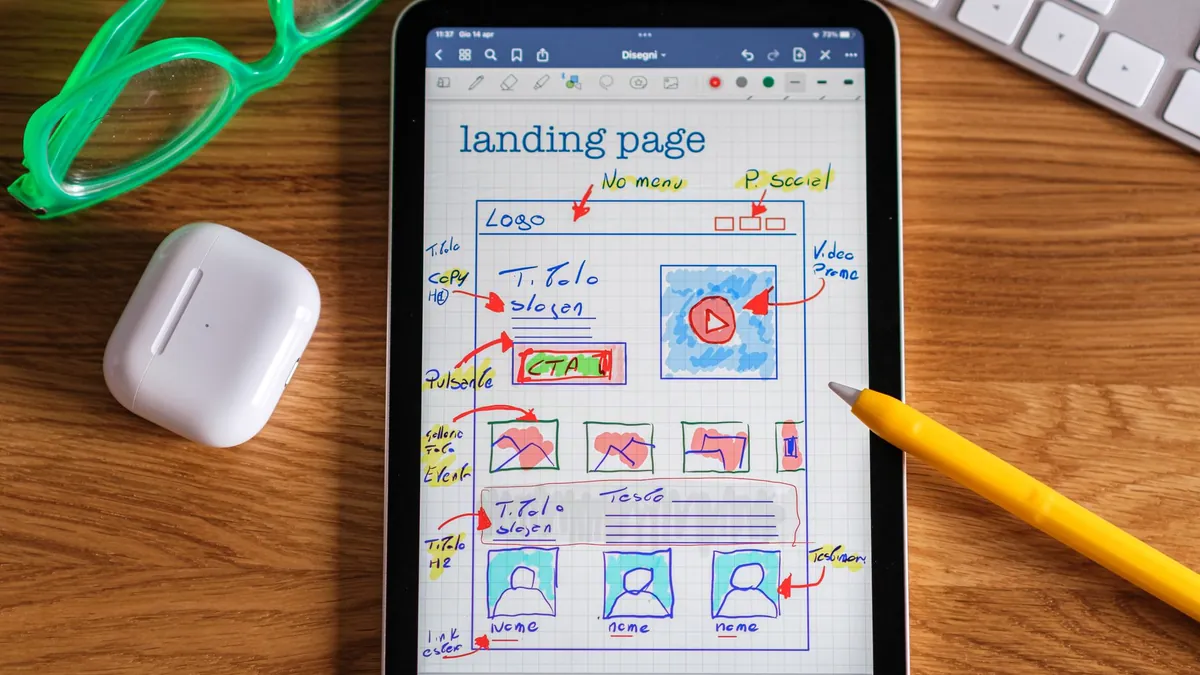
That makes it ideal for early work. Think of wireframes (rough page sketches), type scales, grid tests and the first three rounds of a landing page. A lorem ipsum generator gives you exactly the number of paragraphs, sentences or words you need. This matters because the visual weight of a block of text depends on its length as much as on the font.
When real-looking copy is better
The weakness of nonsense text is also its strength. Nobody reads it, so nobody notices what it hides. A design can look balanced with three tidy lorem ipsum paragraphs. Then it falls apart when the real headline is 14 words long. Or the product name is 48 characters. Or the German translation runs 30 per cent longer than the English. Once a design has real structure, switch to copy that behaves like the final content.
| Element | Realistic test length | What nonsense text hides |
|---|---|---|
| Page headline | Both 3 words and 14 words | Wrapping onto three lines, pushing the hero image down |
| Button label | 2 to 5 words, plus a translation | Buttons that stretch or truncate when "Buy" becomes "In den Warenkorb" |
| Product or article title in a card | 12 to 80 characters | Cards of uneven height, titles cut off with no ellipsis |
| Person's name | From "Li Na" to "Maximilian Featherstonehaugh-Montgomery" | Overflow in table cells, broken avatar labels |
| Price | 0.99, 1,249.00 and 1,000,000 | Misaligned decimals, missing thousands separators |
| Date | 29 February, 31 December, last Sunday in March | Off-by-one errors and wrong-format displays |
| Empty state | Zero items, zero results | Pages that assume there is always content |
Here is a practical rule. The first time anyone outside the design team sees a screen, it should carry text they could believe. It does not have to be final copy. "Three ways to cut your energy bill this winter" is a good stand-in headline for an article that is not written yet. It tells a stakeholder far more than "Lorem ipsum dolor sit amet" ever will.
Keep two versions of every text field in your test data. Make one short and one uncomfortably long. Most layout bugs live at the extremes, not in the average case.
Placeholder names and usernames
Test data about names often goes wrong in two opposite ways. Some developers type "test test" and "asdf" into every field. Then the staging site (the practice copy of the site) is full of records that teach you nothing about a real list of customers. Others pull in a spreadsheet of real people. That is a privacy problem, and we cover it below. The middle path is made-up names that are plausible but belong to nobody.
A good set of test names includes the awkward cases on purpose:
- Apostrophes and hyphens: O'Brien, Smith-Jones. These break simple input checks and database queries that were not built safely.
- Accented and non-Latin characters: Zoë, José, Søren, Nguyễn, 李娜. These show encoding bugs and fonts that lack the right glyphs (letter shapes).
- Very short and very long: Bo Li at one end and a 40-character double-barrelled surname at the other.
- A single name with no surname, because some people have only one name.
- Names that are also words: Grace, Will, April. These catch search and replace that goes too far.
The random name generator makes realistic first and last names in bulk. This is faster than making them up. It also stops you from using your colleagues' names. Some screens show a login name instead of a display name. For those, the random username generator gives you strings in the shapes people really create. They are lowercase words joined by underscores or digits. Some have a year. Some are 20 characters long. Fill a leaderboard with them and you will learn whether the column is wide enough.
Dates and numbers that find the bugs
Date bugs cluster around boundaries. So random dates spread across a range do more work than a few typed by hand. Use a random date tool to make a few hundred dates between two days. Make sure the set includes these:
- 29 February in a leap year (2024 and 2028) and 28 February in a non-leap year.
- The last day of every month, especially 31 January followed by "one month later".
- 1 January and 31 December. These trip up anything that works out the week or quarter number.
- The nights when the clocks change in spring and autumn, if the app shows times.
- Dates that read differently in UK and US formats. 03/04/2026 is 3 April to a British user and 4 March to an American one.
Numbers have their own edge cases. Zero should appear somewhere. "0 items" and "£0.00" are both common, and both are often handled badly. Negative values test refunds and adjustments. 999.99, 1,000 and 1,000,000 test rounding and thousands separators. Percentages over 100 and quantities with three decimal places test whatever checks you thought you had.
A subscription app showed renewal dates correctly for every test account. Then someone made a batch of random dates. One landed on 31 January. "Renews in one month" became 3 March, because JavaScript rolled the missing 31 February forward. Three lines of code fixed it. The random dates found it.

Avoiding real personal data
The quickest way to fill a test system is to copy the production database (the live one). It is also the one approach you should rule out. Customer names, emails and addresses are personal data wherever you work. Test systems are the places with weaker access controls, more people logged in and backups nobody tracks. A breach of staging is a breach. Check your local rules. But assume that real people's details do not belong anywhere except the live system.
Several standards exist to make fake data safe. Use them, so a test record can never reach a real person by accident:
| Type | Safe value | Why |
|---|---|---|
| Email domain | example.com, example.org, example.net | Reserved by the IETF; mail to them goes nowhere |
| Website | example.com, or your own test subdomain | Reserved for documentation; never a real business |
| UK phone number | 01632 960 000 to 01632 960 999 | Set aside by Ofcom for drama and demonstration use |
| US phone number | 555-0100 to 555-0199 with any area code | Reserved for fiction; not assigned to subscribers |
| IP address | 192.0.2.0 to 192.0.2.255 | A documentation range that is never routed on the internet |
| Card number | Your payment provider's published test cards | They process in test mode only and belong to nobody |
If the test system sends email, point every made-up address at a reserved domain. A catch-all mailbox you control also works. It is more common than it should be for a test message to land in a real stranger's inbox. This happens when someone types a plausible Gmail address. The same goes for SMS, push notifications and printed letters.
It is harder than it looks to anonymise a real database by scrambling names. Dates of birth, postcodes and order histories can identify a person on their own. Data made from scratch is both safer and easier to reason about.
What to check before launch
Placeholder content likes to survive into production. It hides in alt text, in the fourth tab nobody clicks, in the email template that only fires on a refund, in the PDF invoice and in the 404 page. Searching the project for a short list of words catches most of it. The search should cover the database and the asset folder as well as the code.
Search for these words, ignoring case: lorem, ipsum, dolor, placeholder, TODO, FIXME, example.com, test@, asdf, coming soon and your own name. On a command line, run grep -ril "lorem" . from the project root. It lists every file that contains the word, whatever its case.
| Check | Where to look | Done |
|---|---|---|
| No lorem ipsum or dummy headlines on any page | Every template, including error pages and modals | [ ] |
| No placeholder images or stock photos with watermarks | Asset folder, CMS media library, email templates | [ ] |
| Alt text and meta descriptions are real | Image tags, page head, social share tags | [ ] |
| Test accounts and generated records removed from production | Users table, orders, comments, reviews | [ ] |
| Transactional emails checked with real copy | Welcome, reset, receipt, refund, reminder templates | [ ] |
| Legal pages are final, not a template | Privacy policy, terms, cookie notice | [ ] |
| Contact details are the real ones | Footer, contact page, invoice template, structured data | [ ] |
| Empty states show real messages | Search with no results, empty basket, new account | [ ] |
| Form placeholders do not read as filled values | Every input with placeholder text in a grey that could pass for black | [ ] |
If the page head is still bare or has a template's dummy title, use the Meta Tag Generator. It builds a real title, description, canonical link and social share tags from a few fields. This is quicker than editing a copied block and missing one line.
Two of those items need a note. Test accounts are easy to forget. The people who made them no longer see them as test accounts. Export the user list. Look for every example.com address and every name that came from a generator. Form placeholders are a different kind of placeholder. They are the grey hint text inside an input. If it is too dark, users think the field is already filled in and skip it. If it is the only label, it disappears as soon as they start typing. Use a visible label above the field and keep the hint short.
Where to go next
For early layouts, the lorem ipsum generator gives you exactly the amount of text you need. When the design is ready for believable data, fill it with people from the random name generator, logins from the random username generator and a spread of dates from the random date generator. Everything is made in your browser. Nothing you generate is stored or sent anywhere.
Frequently asked questions
What does lorem ipsum actually mean?
On its own, nothing. It is a scrambled version of a passage from Cicero, a Roman writer. The passage comes from a book on ethics written in 45 BC. The opening words come from a sentence about pain and pleasure. But the standard placeholder text has words cut and changed, so it is not readable Latin. That is on purpose. Dummy text should look like language without being read as language.
Is it bad to use lorem ipsum in a design?
Not at the start. It is the right choice for wireframes and early layouts, because it stops reviewers reading instead of looking. It becomes a problem when a design is treated as finished while still full of it. Nonsense text never shows headlines that wrap, names that overflow or buttons that grow in translation. Switch to realistic copy of the right lengths as soon as the structure is settled.
Can I use real customer data for testing?
You should not. Names, email addresses and phone numbers are personal data under most privacy laws. Test systems usually have weaker security, more users and untracked backups. Made-up data is safer and more useful, because you can add awkward cases on purpose, such as long names, accented letters and leap-year dates. If you must use real data for a special reason, check your local rules and your consent first.
How do I find leftover placeholder text before launch?
Search the whole project, ignoring case, for lorem, ipsum, dolor, placeholder, TODO, example.com and test@. Include the database, the media library and email templates, not just the page code. Placeholder content often survives in alt text, invoices and rarely sent messages. Then open every page type once, including the 404 page and empty states. Read each one as a visitor would.
What email addresses and phone numbers are safe to use in examples?
Use the domains example.com, example.org and example.net. They are reserved and never deliver mail. For UK phone numbers, Ofcom sets aside 01632 960000 to 01632 960999 for drama and demonstrations. In the US, numbers from 555-0100 to 555-0199 are reserved for fiction. For IP addresses, 192.0.2.0 to 192.0.2.255 is a documentation range. For payment cards, use only the test numbers your payment provider publishes.
Try the tools from this guide
Related guides

UTM Parameters: A Complete Guide to Tracking Campaign Links
What each UTM tag is for, how to name them so reports stay tidy, a ready-made plan for every channel, and how to find the results in GA4.
Read the guide
JWT Explained: What Is Inside a Token and How It Is Verified
A JSON Web Token is three Base64url strings joined by dots. Here is what each one holds, why anyone can read it, what the signature proves, and how to find out why a token expired.
Read the guide
Image Sizes for Social Media and the Web in 2026: The Reference Table
One reference table of pixel sizes and aspect ratios for every major platform, plus the safe zones, the retina 2x rule and the file-size targets that keep images sharp and fast.
Read the guide